

SEQUENCING
Capabilities are enabled without a rollout model
Teams can trial or purchase features quickly, but the value is limited when rollout order, ownership, and dependency planning are unclear.
Endpoint Management
Veles IT Solutions provides Microsoft Intune consulting for organizations using Microsoft Intune, Microsoft Windows Intune management patterns, and Intune Suite capabilities such as Remote Help, Endpoint Privilege Management, Enterprise App Management, Advanced Analytics, Cloud PKI, and endpoint add-ons. We help teams sequence the right capabilities and integrate them into the wider endpoint, identity, and governance model.
Microsoft Intune and Intune Suite are often evaluated as individual features when they need to be treated as endpoint program decisions. Without a clear rollout model, organizations activate add-ons tactically, duplicate existing Microsoft Windows Intune management assumptions, and struggle to connect support workflows, privilege controls, app delivery, analytics, certificates, and governance.
SEQUENCING
Teams can trial or purchase features quickly, but the value is limited when rollout order, ownership, and dependency planning are unclear.

PRIVILEGE
Endpoint Privilege Management only works well when elevation rules, app behavior, support processes, and audit expectations are designed together.

SUPPORT
Remote Help and related endpoint capabilities need role design, escalation logic, and governance boundaries or they simply add another disconnected support path.

VISIBILITY
Advanced Analytics and Cloud PKI are valuable when their outputs are tied to remediation, access policies, Wi-Fi, VPN, and day-two endpoint management decisions.
The work is usually less about activating everything and more about deploying the right Microsoft Intune capabilities in the right order for the environment.
Reduce standing local admin access while still allowing approved elevation scenarios, application workflows, and auditable control over privileged actions.
Design secure help desk support flows with role-based access, technician boundaries, and endpoint support practices that fit enterprise operations.
Use the Enterprise App Catalog to simplify Win32 application onboarding while still aligning packaging, requirements, detection logic, and governance to your standards.
Microsoft Intune Suite adds meaningful endpoint capabilities, but the implementation value depends on how those capabilities fit support workflows, least-privilege policy, app operations, analytics, access design, and the broader Microsoft Intune operating model.
Use analytics-driven insight to understand device experience, anticipate issues, and connect reporting to operational improvement work rather than passive dashboards.
Plan certificate lifecycle management for Wi-Fi, VPN, and authenticated access scenarios without leaving PKI decisions disconnected from the endpoint and identity model.
Support controlled mobile access patterns where app protection, unenrolled devices, and protected access to internal resources all need to fit the same security model.
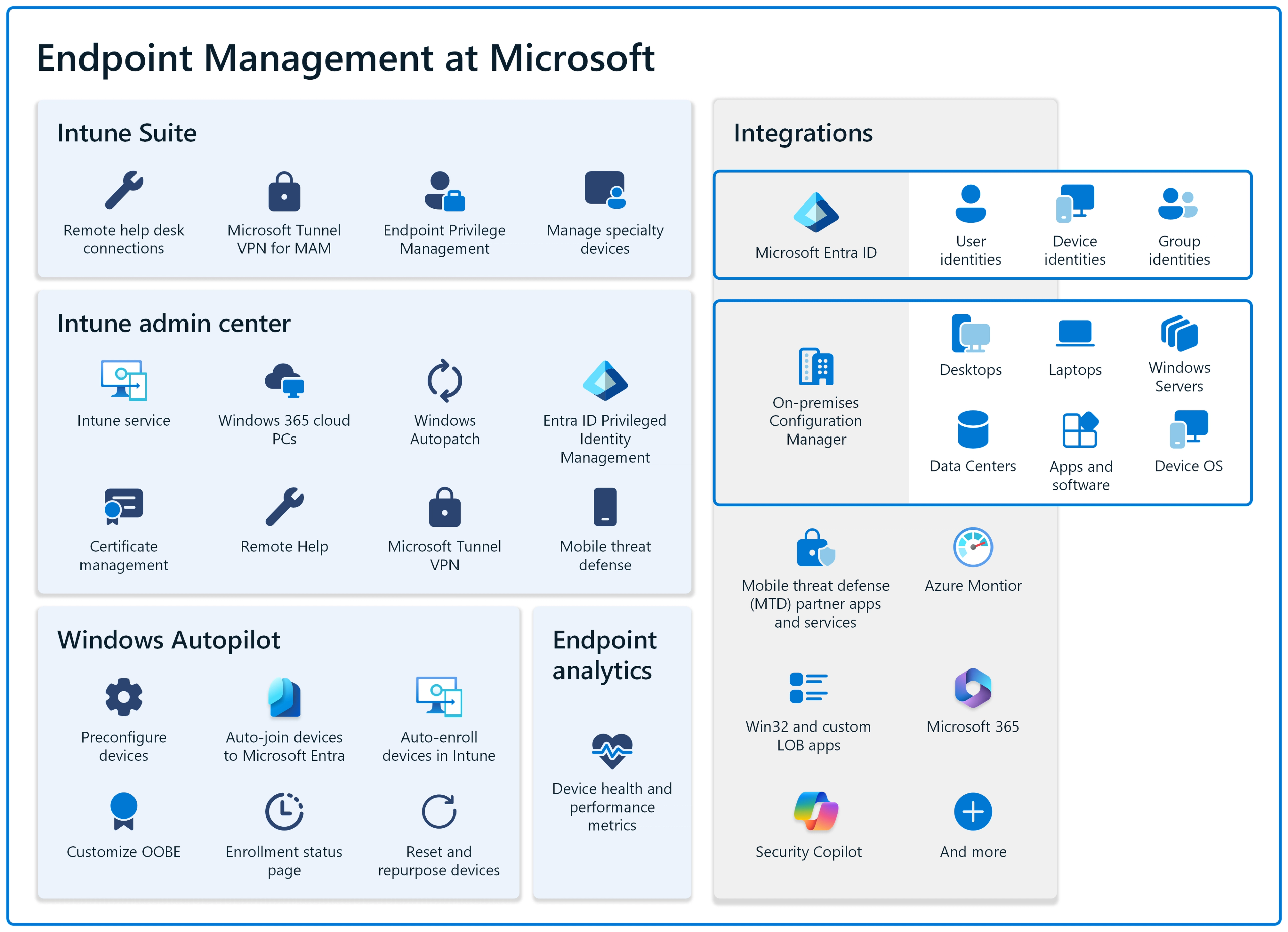
Remote Help, Endpoint Privilege Management, advanced analytics, and application controls only create value when they are mapped to the support scenarios teams actually run.
A useful Intune Suite engagement defines who can use each capability, how requests are approved, what is logged, and how outcomes are reviewed after deployment.
That keeps advanced endpoint tooling from becoming another unmanaged control surface.

The work connects capability selection, user support, privilege boundaries, and endpoint analytics so Suite adoption is deliberate and governable.
Support, privilege, analytics, and governance decisions organized around the same Intune operating cadence.
Suite features are matched to the endpoint problems, support workflows, and reporting needs that justify using them.
Endpoint Privilege Management and support access need approval logic, auditability, and exception handling from the start.
Remote support, analytics review, and operational reporting are built into the rollout rhythm instead of handled after friction appears.
Reference architecture for Windows, Intune, Autopilot, patching, and endpoint governance decisions around the wider platform.
Learn moreThe broader Intune delivery model for device provisioning, policy governance, compliance, patching, and day-two endpoint operations.
Learn moreApplication packaging, updates, privilege assumptions, and lifecycle governance that connect directly to Enterprise App Management work.
Learn moreIdentity-led controls that need to align with privilege management, compliance, certificates, and conditional access decisions.
Learn moreReporting, exception handling, and control frameworks that keep Intune Suite capabilities aligned to policy and audit expectations.
Learn moreOperational intelligence and reporting patterns that can support deeper endpoint visibility and evidence-backed improvement work.
Learn moreIntune Suite rarely stands alone. It usually works best when it is planned as part of a broader endpoint, identity, application, and governance program.
The work usually starts with understanding which Microsoft Intune capabilities are worth implementing, then moves into rollout design, technical integration, and day-two operating ownership.
Review current Intune maturity, licensing posture, support workflows, privilege requirements, application delivery needs, and the broader endpoint control model.
Decide which Intune Suite capabilities make sense first, what dependencies they introduce, and how they should align with device management, identity, and governance decisions.
Roll out the right capabilities with clear scope, technical guardrails, and pilot boundaries so the environment absorbs the change cleanly.
Ensure the new capabilities are tied to service desk operations, reporting, access controls, exception handling, and measurable improvement work after launch.
That approach keeps Microsoft Intune aligned to the endpoint program instead of letting Intune Suite become a collection of disconnected add-ons.
Case Study Reference
Gibson Energy reflects the kind of Microsoft environment where endpoint controls, visibility, governance, and structured delivery all need to move together. That is the same context where Microsoft Intune consulting decisions need to be sequenced with care.
Featured case study
Microsoft Intune Consulting FAQ
Microsoft Intune consulting covers capability assessment, rollout sequencing, technical design, governance, and implementation planning across Microsoft Intune, Microsoft Windows Intune scenarios, Remote Help, Endpoint Privilege Management, Enterprise App Management, Advanced Analytics, Cloud PKI, and related endpoint controls.
The conversation usually starts when core device management is already in place and the environment needs stronger support workflows, least-privilege controls, application delivery efficiency, analytics, or certificate automation beyond the standard baseline.
That depends on the operating constraint. Some environments begin with Remote Help or Endpoint Privilege Management, while others need Enterprise App Management, Cloud PKI, or Advanced Analytics first. The priority should be based on support load, risk, and platform maturity rather than feature availability alone.
Yes. We help organizations decide which capabilities fit the environment, how they should be sequenced, what dependencies exist, and how the rollout should align with broader endpoint, identity, and governance work.
Yes. Intune Suite capabilities are most effective when they are aligned with device management, application control, identity, compliance, and Zero Trust decisions instead of being introduced as isolated add-ons.
Start with a discussion of Microsoft Intune capability fit, rollout order, technical dependencies, and the endpoint operating model required to make Intune useful in production.


